What Are Microsoft Ads?
Microsoft Ads is a paid digital advertising platform. It places your ads across the Microsoft Search Network, which includes Bing, Yahoo, AOL, DuckDuckGo, and hundreds of partner sites.
When a user searches for a product or service, your ad appears at the top or bottom of the results page. You pay only when someone clicks. This model is called pay-per-click advertising, or PPC.
Most digital marketers default to Google Ads. However, Microsoft Ads deserves serious attention in 2026. The platform reaches audiences that Google often misses, at a lower cost and with less competition.
According to Microsoft Advertising, the Microsoft Search Network reaches over 1 billion unique monthly searchers worldwide. That is not a secondary audience. That is a primary opportunity many businesses leave untouched.
Why Microsoft Ads Matter More in 2026
The digital advertising landscape has grown more competitive every year. Google Ads costs have risen sharply across most industries. Average CPCs on Google have increased by over 30% in the past three years in sectors like finance, legal, and healthcare.
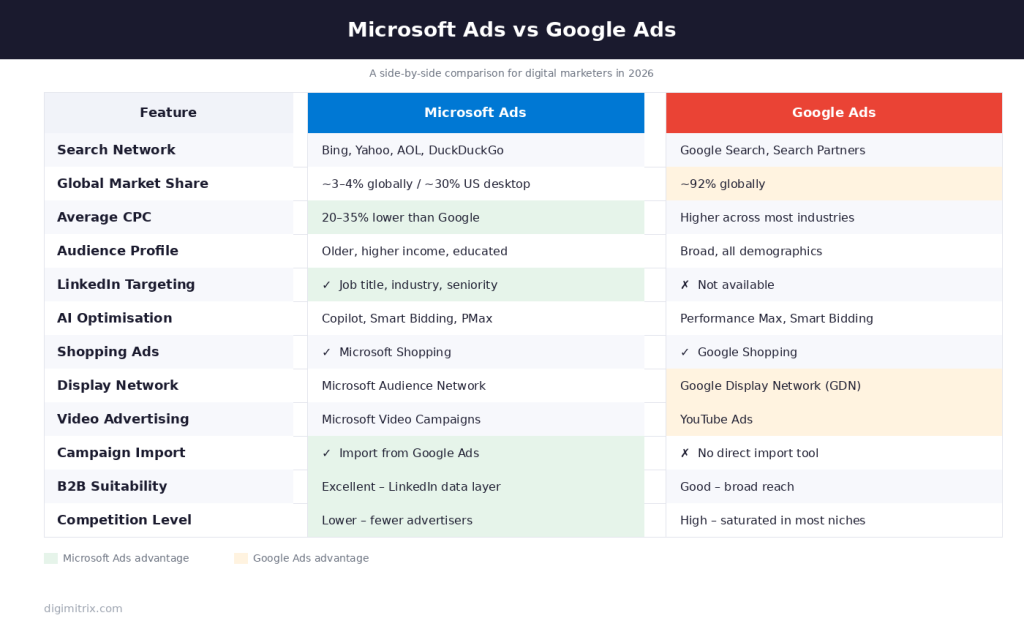
Microsoft Ads, by contrast, consistently delivers lower CPCs. Studies show average CPCs on Microsoft Ads run 20 to 35 percent lower than equivalent Google campaigns. For businesses with fixed ad budgets, that difference means significantly more clicks, more leads, and more conversions per dollar spent.
Beyond cost, the Microsoft Ads audience has a distinct profile. Users on the Microsoft Search Network tend to be older, more educated, and higher earners than the average Google user. For industries targeting professionals, homeowners, or high-income consumers, this audience quality is a direct advantage.
Microsoft Ads also integrates natively with LinkedIn profile data. This makes it the only search advertising platform that allows targeting by job title, industry, company size, and seniority directly within search campaigns. For B2B advertisers, that capability is unmatched anywhere else in paid search.
How Microsoft Ads Works
Microsoft Ads operates on an auction system. Every time a user performs a search, an auction runs in milliseconds to determine which ads appear and in what order.
Your position in that auction depends on two factors. The first is your bid, which is the maximum amount you are willing to pay per click. The second is your Quality Score, which measures the relevance and quality of your ad and landing page.
A higher Quality Score can win a better position than a higher bid alone. Therefore, writing relevant ads and building strong landing pages is just as important as setting competitive bids.
Campaigns within Microsoft Ads are structured in three layers. The account sits at the top. Inside the account, you create campaigns for each product line, service, or goal. Inside each campaign, you create ad groups that hold related keywords and ads together.
This structure allows precise budget allocation, targeted bidding, and clean performance reporting across every part of your advertising activity.
Microsoft Ads Campaign Types in 2026
Microsoft Ads offers several campaign types. Each one serves a different advertising objective.
Search campaigns show text ads when users search for specific keywords. These are the foundation of most Microsoft Ads strategies and deliver the highest purchase intent of any format.
Shopping campaigns display product images, prices, and store names directly in search results. Retailers use shopping campaigns to capture buyers at the exact moment of product search.
Audience campaigns place ads across the Microsoft Audience Network, which includes MSN, Outlook, Microsoft Edge, and thousands of partner sites. These campaigns work well for brand awareness and upper-funnel reach.
Performance Max campaigns use AI to run ads across all Microsoft channels simultaneously. The system optimises delivery automatically based on your conversion goals. In 2026, Performance Max has become the preferred campaign type for advertisers who want broad coverage with minimal manual management.
Video campaigns run across Microsoft’s video inventory. Advertisers use them to build awareness and drive consideration among audiences who engage more with video content than text.
Smart campaigns are designed for small businesses with limited time. Microsoft’s AI manages targeting, bidding, and ad creation based on your business category and goals.
Microsoft Ads vs Google Ads: Key Differences
Many advertisers treat Microsoft Ads as a copy of Google Ads. That framing misses what makes the platform genuinely different.
Google dominates search volume globally with roughly 93% market share. Microsoft holds around 3 to 4% globally, but that number rises significantly in certain regions and demographics. In the United States, Bing commands close to 30% of desktop search queries. For desktop-heavy industries, that share is material.
The competitive gap on Microsoft Ads is also noticeably smaller. Fewer advertisers compete for the same keywords, which keeps CPCs lower and ad positions more accessible for mid-sized businesses.
Targeting options differ meaningfully as well. Google offers broader audience targeting through its Display Network and YouTube. Microsoft offers deeper professional targeting through LinkedIn integration. Neither platform does everything better. Together, they cover the full audience spectrum.
Importing campaigns from Google Ads into Microsoft Ads takes under ten minutes using the built-in import tool. Most advertisers start there and then refine Microsoft-specific settings from that base. Starting with an import removes the barrier of building from scratch.
Setting Up Your First Microsoft Ads Campaign
Building a Microsoft Ads campaign follows a logical sequence. Each step builds on the one before it.
Step 1: Create Your Account
Visit Microsoft Advertising and create a free account. You will need a business email address and basic billing information to get started.
Step 2: Import or Build Your Campaign
If you run Google Ads, use the Google Import tool inside Microsoft Ads to pull your existing campaigns across. If you are starting fresh, select your campaign type, set your geographic targeting, and define your daily budget.
Step 3: Research and Select Keywords
Use the Microsoft Ads Keyword Planner to find high-volume, relevant keywords with manageable competition. Group keywords tightly by theme inside each ad group. Tight grouping improves Quality Scores and ad relevance.
Step 4: Write Your Ads
Each ad needs a compelling headline, a clear description, and a relevant display URL. Write at least three ad variations per ad group. Microsoft Ads will test them and serve the best-performing version more frequently over time.
Step 5: Build or Optimise Landing Pages
Your landing page must match the promise of your ad precisely. If your ad offers a free consultation, the landing page must feature that offer prominently. Disconnect between ad and landing page is the single biggest cause of poor Quality Scores.
Step 6: Set Up Conversion Tracking
Install the Microsoft Ads Universal Event Tracking (UET) tag on your website. This tag records every conversion action, from form submissions and purchases to phone calls and page visits. Without conversion tracking, campaign optimisation is impossible.
Step 7: Launch and Monitor
Set your campaign live and monitor performance daily for the first two weeks. Watch for keyword wastage, poor-performing ad copy, and landing pages with high bounce rates. Adjust bids, pause underperformers, and build on what works.
Microsoft Ads Targeting Options
Precise targeting separates profitable Microsoft Ads campaigns from wasteful ones. The platform offers several layers of targeting that work independently or in combination.
Keyword targeting matches your ads to user search queries. Use a mix of broad match, phrase match, and exact match to control how closely queries must match your keywords.
Location targeting restricts ad delivery to specific countries, regions, cities, or radius around a point. Local businesses use radius targeting to avoid spending on irrelevant geographies.
Device targeting lets you adjust bids by device type. If your landing page converts better on desktop, you can reduce mobile bids to shift budget toward higher-converting traffic.
Audience targeting layers demographic, behavioural, and in-market data on top of keyword targeting. You can increase bids for users who have previously visited your website, viewed specific product pages, or match a target customer profile.
LinkedIn profile targeting is unique to Microsoft Ads. It allows you to layer job function, industry, company, and seniority data directly onto search campaigns. For B2B advertisers, this transforms standard keyword targeting into professional audience targeting with no additional platform needed.
Ad scheduling controls when your ads appear. If your business only operates on weekdays, restrict delivery to those hours. If conversion data shows your audience converts heavily on Tuesday mornings, increase bids for that window specifically.
What Is Multi-Channel Attribution?
Before exploring how multi-channel attribution applies to Microsoft Ads, it is important to understand the concept clearly.
Multi-channel attribution is the process of assigning credit to each marketing touchpoint that contributes to a conversion. A customer rarely converts after a single interaction. Most customers encounter a brand several times across different channels before making a purchase decision.
Consider a typical customer journey. A user sees a display ad on Monday. On Wednesday, they click a Microsoft Ads search ad and visit your website but do not convert. On Friday, they receive a retargeting ad on Instagram. On Saturday, they search again on Bing, click another Microsoft Ads result, and complete a purchase.
Four touchpoints contributed to that conversion. Multi-channel attribution determines how much credit each one deserves.
Without multi-channel attribution, most businesses use last-click attribution by default. Last-click gives 100% of the credit to the final touchpoint before conversion. In the example above, the Saturday Microsoft Ads click gets full credit. Every other touchpoint gets nothing.
Last-click attribution is simple but deeply misleading. It systematically undervalues upper-funnel activity, skews budget allocation toward closing channels, and causes marketers to cut campaigns that are actually driving awareness and consideration.
Multi-channel attribution fixes this by distributing credit more accurately across the full journey. For a broader overview of attribution models and their technical mechanics, Google’s attribution guide provides a solid foundational reference even when applied to non-Google platforms.
Multi-Channel Attribution Models Explained
Several attribution models exist. Each one distributes credit differently.
Last-click attribution gives all credit to the final touchpoint. Simple to implement but ignores all earlier influence.
First-click attribution gives all credit to the first touchpoint. Useful for understanding what drives initial awareness but ignores everything that closes the sale.
Linear attribution distributes credit equally across every touchpoint in the journey. Each channel receives an equal share regardless of its actual influence.
Time-decay attribution gives more credit to touchpoints closer to the conversion. Earlier touchpoints receive progressively less credit. This model suits shorter sales cycles where recency matters most.
Position-based attribution, also called U-shaped attribution, gives 40% credit to the first touchpoint, 40% to the last, and distributes the remaining 20% equally across all touchpoints in between. This model balances awareness and conversion credit well.
Data-driven attribution uses machine learning to analyse your actual conversion data and assign credit based on real patterns in your audience’s behaviour. In 2026, data-driven attribution has become the recommended default for most advertisers because it reflects reality rather than applying a fixed formula.
Microsoft Ads supports multiple attribution models within its reporting suite. Switching between models reveals how different channels and campaigns appear depending on how you distribute credit.
How Multi-Channel Attribution Applies to Microsoft Ads
Microsoft Ads rarely operates in isolation. Most advertisers run it alongside Google Ads, Meta, email, organic search, and other channels simultaneously. Multi-channel attribution is the tool that tells you how Microsoft Ads fits into that broader picture.
Without proper attribution, Microsoft Ads is frequently undervalued. Here is why.
Microsoft Ads often plays a mid-funnel role in the customer journey. A user may first discover a brand through a social media ad. They then search on Bing, click a Microsoft Ads result, read content, and leave without converting. Days later, they return through a Google search and convert.
Under last-click attribution, Google Ads gets full credit. Microsoft Ads gets nothing. The budget review shows Microsoft Ads producing zero conversions. The team cuts it. Weeks later, conversion volume across all channels drops because the mid-funnel touchpoint that was warming audiences has been removed.
Multi-channel attribution prevents this mistake. By showing that Microsoft Ads assisted 40% of all conversions even when it was not the final click, the data justifies maintaining or increasing that investment.
Microsoft Ads provides its own multi-touch reporting through the Multi-Channel Funnels report inside the platform. This report shows how Microsoft Ads campaigns interact with other channels across the conversion path. You can see how many conversions were assisted, the average number of touchpoints before conversion, and how different campaign types contribute at different stages of the funnel.
For more granular cross-platform attribution, pairing Microsoft Ads data with a third-party tool like Google Analytics 4, Northbeam, or Triple Whale gives a unified view across every channel. These tools ingest data from all sources and apply a consistent attribution model so no single platform’s native reporting skews the picture.
At Digimitrix, we build multi-channel attribution frameworks that treat Microsoft Ads as a full partner in the customer journey, not an afterthought. This approach consistently reveals value that last-click reporting conceals.
Microsoft Ads and AI-Powered Optimisation in 2026
Artificial intelligence now drives a significant portion of Microsoft Ads performance. In 2026, advertisers who engage with AI tools inside the platform consistently outperform those who rely on manual optimisation alone.
Smart bidding strategies like Target CPA and Target ROAS use machine learning to adjust bids in real time. The system analyses hundreds of signals per auction, including device, location, time of day, audience segment, and historical conversion probability, then sets the optimal bid automatically.
Responsive Search Ads allow advertisers to provide up to 15 headlines and 4 descriptions. Microsoft’s AI tests combinations and serves the best-performing version to each user. Over time, the system learns which combinations resonate with different audience segments and prioritises those accordingly.
Automated audience expansion identifies users who behave similarly to your existing converters and extends campaign reach to those new users without requiring manual audience list building.
Copilot for Microsoft Advertising launched as a productivity tool in 2024 and has matured significantly since. In 2026, it assists with keyword suggestions, ad copy generation, campaign diagnostics, and budget recommendations directly within the platform interface.
For a detailed breakdown of how AI is reshaping paid search, Search Engine Land’s coverage of Microsoft Advertising AI features provides regularly updated insights.
Microsoft Ads for B2B Advertisers
Microsoft Ads holds a particularly strong position in B2B digital marketing. The combination of search intent targeting and LinkedIn profile data creates a targeting capability no other platform offers.
A software company targeting IT managers can run search campaigns that trigger on relevant keywords and simultaneously filter delivery to users whose LinkedIn profiles match the IT manager job function. The result is paid search traffic pre-qualified by professional role, not just search query.
B2B purchase cycles are long. Buyers research solutions for weeks or months before converting. Multi-channel attribution matters enormously in this context because the gap between first touchpoint and conversion is wide. A Microsoft Ads click that occurred six weeks before a form submission still contributed meaningfully to that outcome.
Position-based or data-driven attribution models work best for B2B Microsoft Ads campaigns. Both models acknowledge the influence of early touchpoints rather than erasing them in favour of the final click.
Pairing Microsoft Ads search campaigns with LinkedIn Sponsored Content creates a reinforcing loop. A prospect who sees your LinkedIn content and then searches for your brand or category on Bing is a high-intent, pre-warmed audience. Serving them a Microsoft Ads result at that moment converts at significantly higher rates than cold traffic.
Our paid media management services at Digimitrix include integrated Microsoft Ads and LinkedIn strategies built specifically for B2B advertisers who need both reach and precision.
Key Metrics to Track in Microsoft Ads
Tracking the right metrics keeps Microsoft Ads campaigns moving in the right direction. Focus on these measures consistently.
Impression share shows what percentage of eligible auctions your ads actually appeared in. Low impression share indicates budget constraints or Quality Score issues worth addressing.
Click-through rate (CTR) measures how often users click after seeing your ad. Low CTR signals weak ad copy or poor keyword-to-ad relevance.
Quality Score rates keyword relevance, ad relevance, and expected landing page experience on a scale of one to ten. Scores above seven indicate strong alignment. Scores below five require immediate attention.
Cost per click (CPC) shows your average spend per click. Track this against Google Ads benchmarks in your industry to confirm you are capturing the cost advantage Microsoft Ads offers.
Conversion rate measures the percentage of clicks that result in a desired action. Combined with CPC, it determines your true cost per acquisition.
Cost per acquisition (CPA) is the total spend divided by total conversions. This is your core efficiency metric and the number most campaign decisions should be anchored to.
Return on ad spend (ROAS) calculates revenue generated per dollar of ad spend. For eCommerce advertisers, ROAS is the primary performance indicator.
Assisted conversions from the Multi-Channel Funnels report reveal how many conversions Microsoft Ads influenced without receiving last-click credit. This number is often the most important one for justifying Microsoft Ads investment in a multi-channel strategy.
Common Microsoft Ads Mistakes to Avoid
Even experienced advertisers make avoidable errors on Microsoft Ads. Knowing the most common ones saves budget and time.
Importing Google Ads campaigns without reviewing match types causes immediate wastage. Google’s broad match behaves differently from Microsoft’s. Always audit match types after import and tighten where needed.
Ignoring the Search Terms report means paying for irrelevant queries. Review it weekly and add negative keywords aggressively. Negative keywords on Microsoft Ads have an outsized impact because the platform’s broad match is more expansive than many advertisers expect.
Skipping LinkedIn profile targeting in B2B campaigns is a missed opportunity with no equivalent elsewhere in paid search. Even applying a single layer of job function targeting can dramatically improve lead quality.
Relying on last-click attribution to evaluate Microsoft Ads performance leads to systematic underinvestment in a channel that frequently punches above its weight in assisted conversions. Switching to a position-based or data-driven model almost always reveals more value than last-click data shows.
Neglecting the Microsoft Audience Network as a retargeting surface leaves warm audiences unaddressed. Users who visited your site and did not convert can be retargeted across MSN, Outlook, and Edge at very low CPMs. The network is underused and consequently very cost-efficient.
Integrating Microsoft Ads Into Your Broader Digital Marketing Strategy
Microsoft Ads works best as part of a connected digital marketing ecosystem. Running it in isolation limits its effectiveness.
Search campaigns on Microsoft Ads capture in-market demand. Pairing them with display or social campaigns that build awareness upstream fills the funnel from the top. Prospects who encounter your brand through awareness channels convert at higher rates when they later see your search ads because they already recognise you.
Email marketing integrates with Microsoft Ads through Customer Match. Uploading your email list allows you to target existing contacts or exclude them from prospecting campaigns entirely. Both uses improve campaign efficiency.
SEO and Microsoft Ads reinforce each other. Keywords where your organic rankings are weak are strong candidates for paid coverage. Keywords where you rank organically in position one can be deprioritised in paid to free up budget for higher-impact terms.
Multi-channel attribution is the connective tissue that makes all of this visible. Without it, each channel appears to operate independently. With it, you see how paid search on Microsoft influences email open rates, how social awareness drives branded search volume, and how retargeting lifts conversion rates across every channel downstream.
At Digimitrix, we design digital marketing strategies where every channel informs every other. Microsoft Ads is a central part of that architecture for clients across retail, B2B, healthcare, and professional services.
Conclusion
Microsoft Ads is one of the most underutilised opportunities in digital marketing today. Lower CPCs, a high-quality audience, unique LinkedIn targeting, and strong AI optimisation tools make it a platform that rewards advertisers who invest in it seriously.
Multi-channel attribution is the lens that reveals the full value of that investment. When you move beyond last-click reporting and start measuring how Microsoft Ads contributes across the entire customer journey, the platform’s true performance becomes clear.
In 2026, the most successful advertisers are not those who simply spend more. They are the ones who understand where each channel fits, how channels reinforce each other, and how to read attribution data with enough sophistication to make better budget decisions.
Microsoft Ads, understood and measured correctly, belongs in that strategy without question.